Spring启用注解的两种方式

Spring的context命名空间提供两个非常重要的注解 <context:annotation-config><context:component-scan>

context:annotation-config

<context:annotation-config>的作用是 显示地向Spring容器中注册以下4个BeanPostProcessor,激活已经通过xml注册过的Bean,之后应用就可以通过注解直接使用Bean。

  • AutowiredAnnotationBeanPostProcessor
  • CommonAnnotationBeanPostProcessor
  • PersistenceAnnotationBeanPostProcessor
  • RequiredAnnotationBeanPostProcessor

这4个XxxxxxBeanPostProcessor的作用就是为了让spring识别相应的注解。
如果想使用@Autowired,那么就必须事先在 Spring 容器中声明AutowiredAnnotationBeanPostProcessor Bean。声明方式如下

1
<bean class="org.springframework.beans.factory.annotation.AutowiredAnnotationBeanPostProcessor "/>

  • 如果想使用 @Resource 、@PostConstruct、@PreDestroy 等注解就必须声明CommonAnnotationBeanPostProcessor
  • 如果想使用 @PersistenceContext注解,就必须声明PersistenceAnnotationBeanPostProcessor的Bean。
  • 如果想使用 @Required的注解,就必须声明RequiredAnnotationBeanPostProcessor的Bean。声明方式如下
    1
    <bean class="org.springframework.beans.factory.annotation.RequiredAnnotationBeanPostProcessor "/>

如果想使用以上注解,需要直接在Spring配置文件中定义这些Bean,显然这种方式比较笨拙,也不够优雅。Spring为我们提供了一种极为方便注册这些BeanPostProcessor的方式,如下,它会隐式地向 Spring容器注册上述BeanPostProcessor。<context:annotation-config/>

context:component-scan

<context:component-scan> 除了具有<context:annotation-config/>的作用外,还具有以下作用

  • 通过base-package属性执行一个需要扫描的基类包,Spring容器将会扫描这个基类包里的所有类并从类的注解(@Component @Controller@Service等)信息中获取Bean的定义信息。
  • 如果仅希望扫描特定的类而非基包下的所有类,那么可以使用resource-pattern属性过滤出特定的类,如下所示:
    1
    <context:component-scan base-package="com.meituan" resource-pattern="anno/*.class" />

这里resource-pattern设置为 “anno/*.class” , 意味着Spring仅会扫描基包里 anno 子包中的类。

  • Spring还提供 <context:component-scan />的过滤子元素实现来实现 resource-pattern 属性不能满足的一些特殊需求。比如:仅过滤基类包中实现了XxxService接口的类 或 标注类某个特定注解的类等。如下:
    1
    2
    3
    4
    5
    <context:component-scan base-package ="com.meituan" >
    <context:include-filter type="annotation" expression="org.springframework.stereotype.Controller" />
    <context:include-filter type="aspectj" expression="com.meituan..*Controller+" />
    <context:exlude-filter type="regex" expression="com\.meituan\.anno.*"/>
    </context:component-scan>

  • 其中<context:include-filter>表示 要包含的目标类,而<context:exclude-filter>表示要排除在外的目标类。
  • 一个<context:component-scan>可以包含若干个<context:include-filter><context:exclude-filter>元素。
  • 这两个过滤元素均支持多种类型的过滤表达式,表达式类型如下:
Filter Type Example Expression Description
annotation (default) org.example.SomeAnnotation An annotation to be present at the type level in target components.所有标注了 XxxAnnotation的类。该类型针对 目标类是否标注了某个注解来进行过滤。
assignable org.example.SomeClass A class (or interface) that the target components are assignable to (extend/implement).所有继承或实现 XxxClass 的类。该类型针对 目标类是否继承或实现某个特定类来进行过滤。
aspectj org.example..*Service+ An AspectJ type expression to be matched by the target components.所有类名以 Service结束的类以继承或扩展它们的类。该类型针对AspectJ表达式进行过滤。
regex org\.example\.Default.* A regex expression to be matched by the target components class names.所有org.example.Default 类包下的类。该类型 使用正则表达式对目标类的类名进行过滤。
custom org.example.MyTypeFilter A custom implementation of the org.springframework.core.type .TypeFilter interface.采用XxxTypeFilter采用代码的方式进行过滤。该类必须实现 org.springframework.core.type.TypeFilter 接口

在所有这些过滤类型中,除custom类型外,aspectj 的过滤表达式能力是最强的,它可以轻易的实现其他类型所能表达的过滤规则。
下面的例子忽略所有org.example 包下的 @Repository注解的类,注入org.example.*Stub结尾的包下的所有 Repository结尾的类。

注解方式:

1
2
3
4
5
6
7
8
9
10
11
12
13
14
15
16
17
18
@Configuration
@ComponentScan(basePackages = "org.example",
includeFilters = @Filter(type = FilterType.REGEX, pattern = ".*Stub.*Repository"),
excludeFilters = @Filter(Repository.class))
public class AppConfig {
...
}
```
xml配置方式:
```java
<beans>
<context:component-scan base-package="org.example">
<context:include-filter type="regex"
expression=".*Stub.*Repository"/>
<context:exclude-filter type="annotation"
expression="org.springframework.stereotype.Repository"/>
</context:component-scan>
</beans>

use-default-filters 属性

<context:component-scan> 有一个use-default-filters属性,该属性默认为true,这就意味着会扫描 指定包及其子包 的全部的标有@Component的类及其子注解子注解@Service、@Reposity、@Controller等,并注入bean
如下配置,说明 : use-default-filter 默认为 true ,此时 Spring 会对 base-package包或者子包 下的所有的进行java类进行扫描,并注入bean

1
<context:component-scan base-package="com.meituan.hotel" />

但是这种扫描方式粒度过大,如果只想扫描 指定包下面的Controller,该怎么办?此时就可以用 <context:component-scan> 的 子标签<context:incluce-filter>
如下配置,说明:此时Spring就只会扫描 base-package中有 @Controller注解 的java类,不会扫描@Service、@Repository注解的java类。

1
2
3
<context:component-scan base-package="com.meituan.hotel.controller">
<context:include-filter type="annotation" expression="org.springframework.stereotype.Controller"/>
</context:component-scan>

但是如果使用如下方式,use-dafault-filter默认为ture,不仅会扫描 base-package(注意值发生变化) 中 @Controller注解 的java类,还会扫描@Service、@Repository 注解的java类,这样可能造成一些问题

1
2
3
<context:component-scan base-package="com.meituan.hotel">
<context:include-filter type="annotation" expression="org.springframework.stereotype.Controller"/>
</context:component-scan>

此时 <context:include-filter/> 并没有起到作用,只要把use-default-filter设置成false就可以了。这样就可以避免 在base-packeage配置多个包名这种不是很优雅的方法来解决这个问题了。

原因分析:

  • 先看 context:component-scan 标签的解析过程
1
2
3
4
5
6
7
8
9
10
11
12
13
14
15
16
17
18
19
20
21
22
23
24
25
26
27
package org.springframework.context.config;
import org.springframework.beans.factory.xml.NamespaceHandlerSupport;
import org.springframework.context.annotation.AnnotationConfigBeanDefinitionParser;
import org.springframework.context.annotation.ComponentScanBeanDefinitionParser;
/**
* {@link org.springframework.beans.factory.xml.NamespaceHandler}
* for the '{@code context}' namespace.
*
* @author Mark Fisher
* @author Juergen Hoeller
* @since 2.5
*/
public class ContextNamespaceHandler extends NamespaceHandlerSupport {
@Override
public void init() {
registerBeanDefinitionParser("property-placeholder", new PropertyPlaceholderBeanDefinitionParser());
registerBeanDefinitionParser("property-override", new PropertyOverrideBeanDefinitionParser());
registerBeanDefinitionParser("annotation-config", new AnnotationConfigBeanDefinitionParser());
registerBeanDefinitionParser("component-scan", new ComponentScanBeanDefinitionParser()); // 这里完成对<context:component-scan/>标签的解析
registerBeanDefinitionParser("load-time-weaver", new LoadTimeWeaverBeanDefinitionParser());
registerBeanDefinitionParser("spring-configured", new SpringConfiguredBeanDefinitionParser());
registerBeanDefinitionParser("mbean-export", new MBeanExportBeanDefinitionParser());
registerBeanDefinitionParser("mbean-server", new MBeanServerBeanDefinitionParser());
}
}

ComponentScanBeanDefinitionParser会读取配置文件信息并组装成org.springframework.context.annotation.ClassPathBeanDefinitionScanner进行处理;


  • 如果没有配置<context:component-scan>use-default-filters属性,则默认为true,在创建ClassPathBeanDefinitionScanner时会根据use-default-filters是否为true来调用如下代码:
1
2
3
4
5
6
7
8
9
10
11
12
13
14
15
16
17
18
19
20
21
22
23
24
25
26
27
28
29
30
31
32
33
34
35
36
37
38
39
40
41
42
43
44
45
46
47
48
/**
* Create a ClassPathScanningCandidateComponentProvider with the given {@link Environment}.
* @param useDefaultFilters whether to register the default filters for the
* {@link Component @Component}, {@link Repository @Repository},
* {@link Service @Service}, and {@link Controller @Controller}
* stereotype annotations
* @param environment the Environment to use
* @see #registerDefaultFilters()
*/
public ClassPathScanningCandidateComponentProvider(boolean useDefaultFilters, Environment environment) {
if (useDefaultFilters) {
registerDefaultFilters();
}
Assert.notNull(environment, "Environment must not be null");
this.environment = environment;
}
/**
* Register the default filter for {@link Component @Component}.
* <p>This will implicitly register all annotations that have the
* {@link Component @Component} meta-annotation including the
* {@link Repository @Repository}, {@link Service @Service}, and
* {@link Controller @Controller} stereotype annotations.
* <p>Also supports Java EE 6's {@link javax.annotation.ManagedBean} and
* JSR-330's {@link javax.inject.Named} annotations, if available.
*
*/
@SuppressWarnings("unchecked")
protected void registerDefaultFilters() {
this.includeFilters.add(new AnnotationTypeFilter(Component.class));
ClassLoader cl = ClassPathScanningCandidateComponentProvider.class.getClassLoader();
try {
this.includeFilters.add(new AnnotationTypeFilter(
((Class<? extends Annotation>) ClassUtils.forName("javax.annotation.ManagedBean", cl)), false));
logger.debug("JSR-250 'javax.annotation.ManagedBean' found and supported for component scanning");
}
catch (ClassNotFoundException ex) {
// JSR-250 1.1 API (as included in Java EE 6) not available - simply skip.
}
try {
this.includeFilters.add(new AnnotationTypeFilter(
((Class<? extends Annotation>) ClassUtils.forName("javax.inject.Named", cl)), false));
logger.debug("JSR-330 'javax.inject.Named' annotation found and supported for component scanning");
}
catch (ClassNotFoundException ex) {
// JSR-330 API not available - simply skip.
}
}

可以看到默认ClassPathBeanDefinitionScanner会自动注册对@Component、@ManagedBean、@Named注解的Bean进行扫描。

  • 在进行扫描时会通过include-filter 和 exclude-filter来判断你的Bean类是否是合法的:
    1
    2
    3
    4
    5
    6
    7
    8
    9
    10
    11
    12
    13
    14
    15
    16
    17
    18
    19
    /**
    * Determine whether the given class does not match any exclude filter
    * and does match at least one include filter.
    * @param metadataReader the ASM ClassReader for the class
    * @return whether the class qualifies as a candidate component
    */
    protected boolean isCandidateComponent(MetadataReader metadataReader) throws IOException {
    for (TypeFilter tf : this.excludeFilters) {
    if (tf.match(metadataReader, this.metadataReaderFactory)) {
    return false;
    }
    }
    for (TypeFilter tf : this.includeFilters) {
    if (tf.match(metadataReader, this.metadataReaderFactory)) {
    return isConditionMatch(metadataReader);
    }
    }
    return false;
    }

可以看到 首先 对 exclude-filter 进行黑名单过滤;然后对 include-filter 进行白名单过滤;否则默认排除。
此时问题的根源就找到了: use-default-filter设置成false 即可解决问题。


  • 如果同时配置,必须先配置<context:include-filter/>,然后载配置 <context:exclude-filter/>,否则报错。
    Alt text

原因:在spring-context-3.0.xsdcomponent-scan 元素定义如下, 其中 xsd:sequence 定义的是 元素的次序,so……
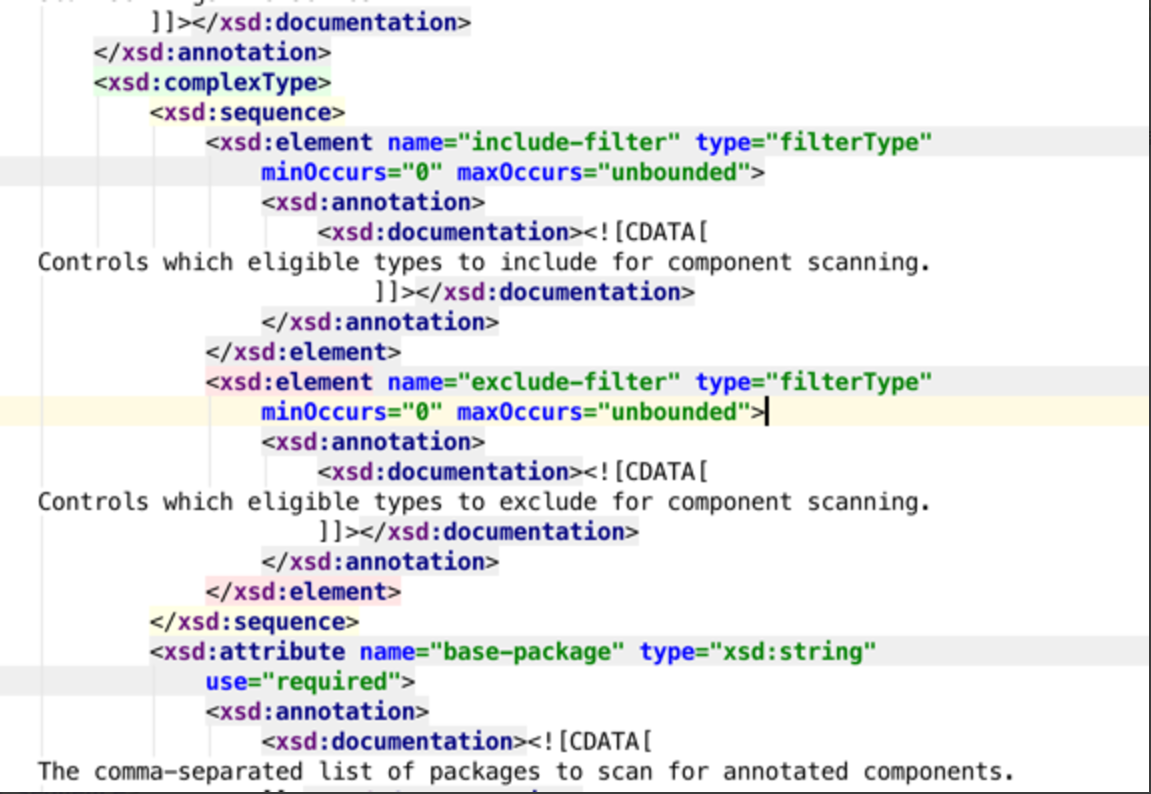
Alt text

参考文档:spring-beans-annotation-config
