Spring事件驱动模型

JAVA事件模型与Spring事件机制学习

事件驱动模型 实例

首先看一个我们在项目中基本都会涉及到的 实例 :用户注册。
用户注册成功后,需要做的事情: 增加积分、发确认邮件、发送各种券、对用户数据进行索引等等……. 一般情况下会做如下设计:
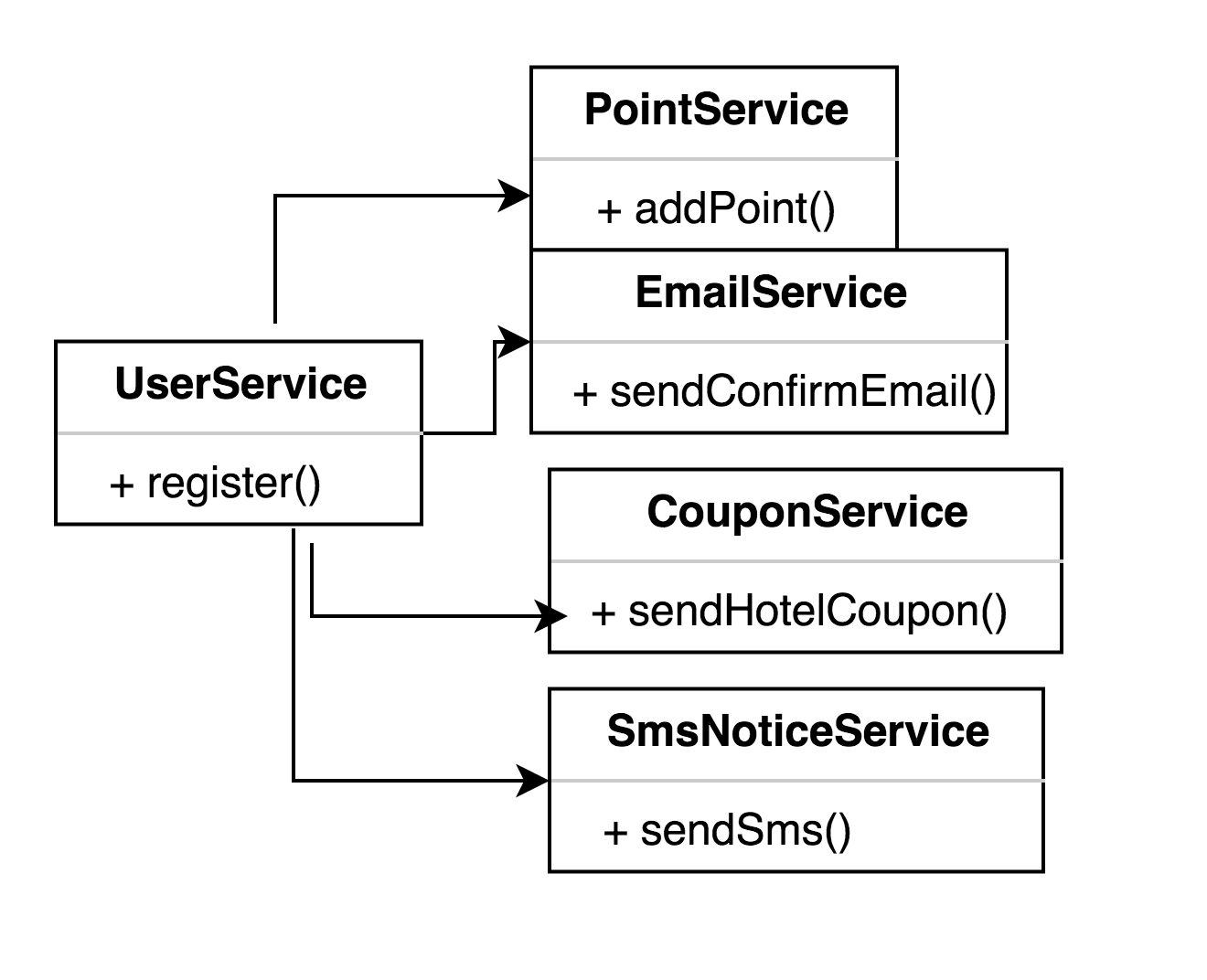

Alt text

那么这样的设计都存在哪些问题呢?

  • UserService和 其他Service耦合严重,若想在增加功能或者删减功能 都比较麻烦;
  • 有些功能可能需要调用第三方系统,如 增加积分、索引用户、发送短信,速度可能比较慢,此时需要异步支持;

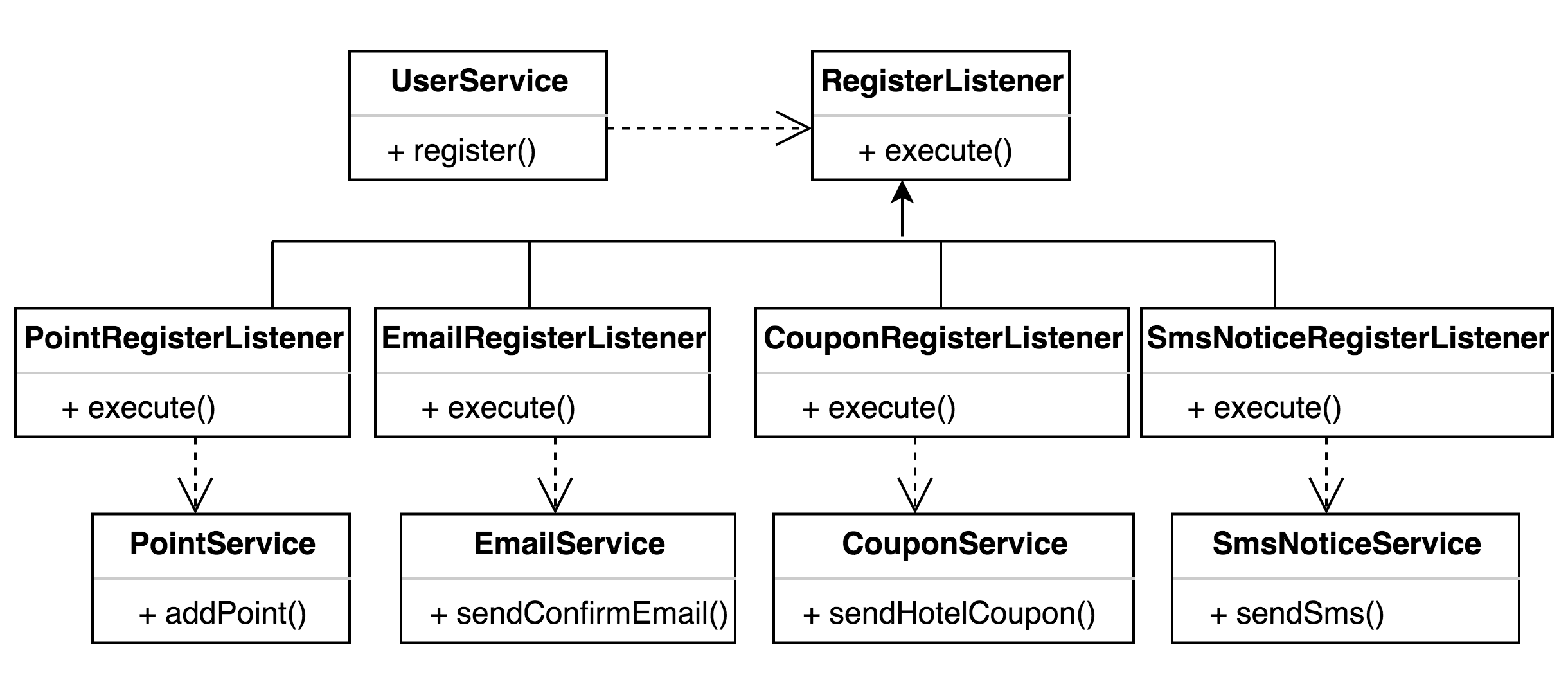
从如上例子可以看出,应该使用一个观察者来解耦这些Service之间的依赖关系,如图:
Alt text

增加了一个Listener来解耦 UserService 和其他服务,即注册成功后,只需要通知相关的监听器,不需要关系它们如何处理。增加功能或者删减功能都会变得非常容易。

这就是一个典型的事件处理模型或者叫发布/订阅模型或者观察者模式

通过Listener 解耦目标对象和它的依赖对象,目标只需要通知它的依赖对象,具体怎么处理,依赖对象自己决定。比如是异步还是同步,延迟还是非延迟等。

这其中 既 使用了DIP(依赖倒置原则,依赖于抽象,而不是具体 ) , 又使用了IoC思想,即以前主动去创建它依赖的Service,现在只是被动等待别人注册进来。主要目的就是:松散耦合对象间的一对多的依赖关系。

接下来设计模式之观察者模式。

观察者模式

  1. 观察者模式的定义

观察者模式又称为 发布/订阅模式 或者 事件驱动。其定义了一种一对多的依赖关系,让多个观察者对象同时监听某一个主题对象。这个主题对象在状态上发生变化时,会通知所有观察者对象,让它们能够自动更新自己。此种模式通常被用来实作事件处理系统。

  1. 观察者模式的组成

抽象主题角色 (Subject) :把所有对观察者对象的引用保存在一个集合中,每个抽象主题角色都可以有任意数量的观察者。抽象主题提供一个接口,可以增加和删除观察者角色。一般用一个抽象类和接口来实现。


抽象观察者角色 (Observer) :为所有具体的观察者定义一个接口,在得到主题的通知时更新自己。


具体主题角色 ( SubjectConcrete ):在具体主题内部状态改变时,给所有登记过的观察者发出通知。具体主题角色通常用一个子类实现。


具体观察者角色( ObserverConcrete ):该角色实现抽象观察者角色所要求的更新接口,以便使本身的状态与主题的状态相协调。通常用一个子类实现。如果需要,具体观察者角色可以保存一个指向具体主题角色的引用。

  1. 观察者模式的好处

观察者模式 将 观察者 和 被观察的对象 分离开。观察者和被观察者之间存在“观察”的逻辑关联,当被观察者发生改变的时候,观察者就会观察到这样的变化,并且做出相应的响应。

举个例子,支付中心 可以作为一个观察者,业务数据的状态 是被观察者,当业务数据的状态 发生变化后,就会告知支付中心作出相应的 动作。
面向对象设计的一个原则是:系统中的每个类将重点放在某一个功能上,而不是其他方面。一个对象只做一件事情,并且将他做好。观察者模式在模块之间划定了清晰的界限,提高了应用程序的可维护性和重用性。

  1. 观察者模式示例

    对上述角色进行抽象,类图如下:

1
2
3
4
5
6
7
8
9
/**
* 抽象观察者角色
*/
public abstract class Observer {
/**
* 订阅者更新发布者发布的内容
*/
public abstract void update();
}
1
2
3
4
5
6
7
8
9
10
11
12
13
14
15
16
17
18
19
20
21
22
23
24
25
26
27
28
29
30
import java.util.ArrayList;
import java.util.List;
/**
* 抽象主题角色定义
*/
public abstract class Subject {
private List<Observer> observers = new ArrayList<>();
/**
* 添加观察者
* @param observer
*/
public void addObserver(Observer observer){
observers.add(observer);
}
/**
* 删除观察者
* @param observer
*/
public void deleteObserver(Observer observer){
observers.remove(observer);
}
/**
* 发布给所有观察者
*/
public void Notify(){
for(Observer observer : observers){
observer.update();
}
}
}
1
2
3
4
5
6
7
8
9
10
11
12
13
14
15
16
17
18
/**
* 具体主题角色
*/
public class SubjectConcrete extends Subject {
// 订单状态
private OrderStatus orderStatus;
public OrderStatus getOrderStatus() {
return orderStatus;
}
/**
* 订单状态,通知观察者
* @param orderStatus
*/
public void setOrderStatus(OrderStatus orderStatus) {
this.orderStatus = orderStatus;
this.Notify();
}
}
1
2
3
4
5
6
7
8
9
10
11
12
13
14
15
16
17
18
19
20
21
22
23
/**
* 具体观察者角色
*/
public class ObserverConcrete extends Observer {
private String name;
private SubjectConcrete concreteSubject;// 发布者实现类
/**
* @param concreteSubject
* @param name
*/
public ObserverConcrete(SubjectConcrete concreteSubject, String name) {
this.concreteSubject = concreteSubject;
this.name = name;
}
/**
* 获得发布者 的最新数据
*/
@Override
public void update() {
OrderStatus orderStatus = concreteSubject.getOrderStatus();
System.out.println("观察者【" + name + "】,观察到订单 【"+orderStatus.name()+"】," + orderStatus.getName());
}
}
1
2
3
4
5
6
7
8
9
10
11
12
13
14
15
16
17
18
19
20
21
22
23
24
25
26
27
28
29
30
31
32
33
public enum OrderStatus {
create(1010,"创建订单"),
pay_wait(1020,"等待支付"),
pay_time_out(1021,"支付超时"),
pay_result_failed(1022,"支付失败"),
pay_result_success(1030,"支付成功"),
checked_out_ing(1040,"退房中"),
checked_out_failed(1041,"退房失败"),
checked_out_success(1042,"退房成功"),
refund_ing(1050,"退款中"),
refund_failed(1051,"退款失败"),
refund_success(1052,"退款成功");
private int status;
private String name;
private OrderStatus(int status,String name){
this.status = status;
this.name = name;
}
public int getStatus() {
return status;
}
public String getName() {
return name;
}
public static OrderStatus findByValue(int value){
for(OrderStatus orderStatus : OrderStatus.values()){
if(orderStatus.getStatus()==value){
return orderStatus;
}
}
return null;
}
}

Main 方法运行

1
2
3
4
5
6
7
8
9
10
11
public class Test {
public static void main(String[] args) {
// 创建发布者
SubjectConcrete subjectConcrete = new SubjectConcrete();
// 加入观察者
subjectConcrete.addObserver(new ObserverConcrete(subjectConcrete, "支付中心"));
// 发布者更新发布信息 并且发给订阅者
subjectConcrete.setOrderStatus(OrderStatus.create);
subjectConcrete.setOrderStatus(OrderStatus.pay_result_success);
}
}

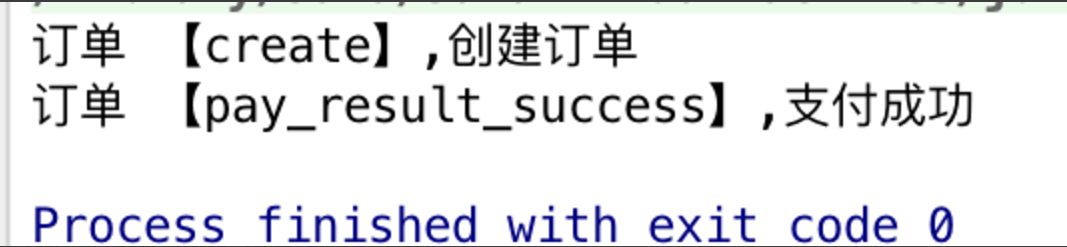
运行结果:
Alt text

接下来我们看看jdk中的观察者模式。

JDK中 观察者模式的实现及简单应用

  1. JDK 中观察者模式通过 Observer接口和Observable类实现。具体源码如下
    1
    2
    3
    4
    5
    6
    package java.util;
    // 观察者,
    public interface Observer {
    // 只要改变了 observable 对象就调用此方法。
    void update(Observable o, Object arg);
    }
1
2
3
4
5
6
7
8
9
10
11
12
13
14
15
16
17
18
19
20
21
22
23
24
25
26
27
28
29
30
31
32
33
34
35
36
37
38
39
40
41
42
43
44
45
46
47
48
49
50
51
52
53
54
55
package java.util;
// 被观察者类
public class Observable {
private boolean changed = false;
private Vector obs; // 观察者类集合
/** Construct an Observable with zero Observers. */
public Observable() {
obs = new Vector();
}
public synchronized void addObserver(Observer o) {
if (o == null)
throw new NullPointerException();
if (!obs.contains(o)) {
obs.addElement(o);
}
}
// 从对象的观察者集合中删除某个观察者。
public synchronized void deleteObserver(Observer o) {
obs.removeElement(o);
}
public void notifyObservers() {
notifyObservers(null);
}
// 如果 changed 指示对象已改变,则通知其所有观察者,并调用 clearChanged 方法来指示此对象不再改变。
public void notifyObservers(Object arg) {
Object[] arrLocal;
synchronized (this) {
if (!changed)
return;
arrLocal = obs.toArray();
clearChanged();
}
for (int i = arrLocal.length-1; i>=0; i--)
//通知观察者,调用观察者的update()方法
((Observer)arrLocal[i]).update(this, arg);
}
public synchronized void deleteObservers() {
obs.removeAllElements();
}
// 标记此 Observable 对象为已改变的对象;
protected synchronized void setChanged() {
changed = true;
}
// 指示对象不再改变,或者它已对其所有的观察者通知了最近的改变。
protected synchronized void clearChanged() {
changed = false;
}
public synchronized boolean hasChanged() {
return changed;
}
public synchronized int countObservers() {
return obs.size();
}
}
  1. 应用
    Java实现了Observer,我们需要做的是:
  • 被观察的Subject对象继承java.util.Observerable
  • 需要观察的对象实现java.util.Observer接口
  • java.util.ObserverableaddObserver(Observer obj)方法把Observer注册到Subject对象中。
  • 这已经完成了大部分的工作了。然后手动调用setChanged()方法后,再调用 notifyObservers()方法,就可以实现Observer模式。
1
2
3
4
5
6
7
8
9
10
11
12
13
14
import java.util.Observable;
import java.util.Observer;
public class OrderObservable extends Observable {
// 订单状态
private OrderStatus orderStatus;
public OrderStatus getOrderStatus() {
return orderStatus;
}
public void setOrderStatus(OrderStatus orderStatus) {
this.orderStatus = orderStatus;
setChanged();//重点!!!!!
notifyObservers();
}
}
1
2
3
4
5
6
7
8
9
10
import java.util.Observable;
import java.util.Observer;
public class OrderStatusChangeObserver implements Observer {
@Override
public void update(Observable o, Object arg) {
OrderObservable orderObservable =(OrderObservable)o;
System.out.println("订单 【"+orderObservable.getOrderStatus().name()+"】," + orderObservable.getOrderStatus().getName());
}
}
1
2
3
4
5
6
7
8
9
10
11
public class MainTest {
public static void main(String[] args) {
// 创建被观察者对象
OrderObservable orderObservable = new OrderObservable();
// 为被观察者对象 增加 观察者
orderObservable.addObserver(new OrderStatusChangeObserver());
// 修改 被观察者对
orderObservable.setOrderStatus(OrderStatus.create);
orderObservable.setOrderStatus(OrderStatus.pay_result_success);
}
}

运行结果
Alt text

  1. 优缺点

JDK中并没有把这两个部分都设计为接口,而是让类java.util.Observerable提供了部分的实现,简化了许多编程的工作。但是这也导致Observable类的扩展性不高,缺乏灵活性,不如自己实现的观察者模式灵活。


notifyObservers方法 首先检查那个内部的标志,以判断状态是否改变,如果是的话,它会调用注册在Subject中的每个Observerupdate()方法。
在JDK中这个方法内部是作为synchronized来实现的,也就是如果发生多个线程同时争用一个java.util.ObserverablenotifyObservers()方法的话,他们必须按调度的等待着顺序执行。

在某些特殊的情况下,这会有一些潜在的问题:可能在等待的过程中,一个刚刚被加入的Observer会被遗漏没有被通知到,而一个刚刚被删除了的Observer会仍然收到它已经不想要了的通知。

JavaBean规范的事件驱动模型/观察者

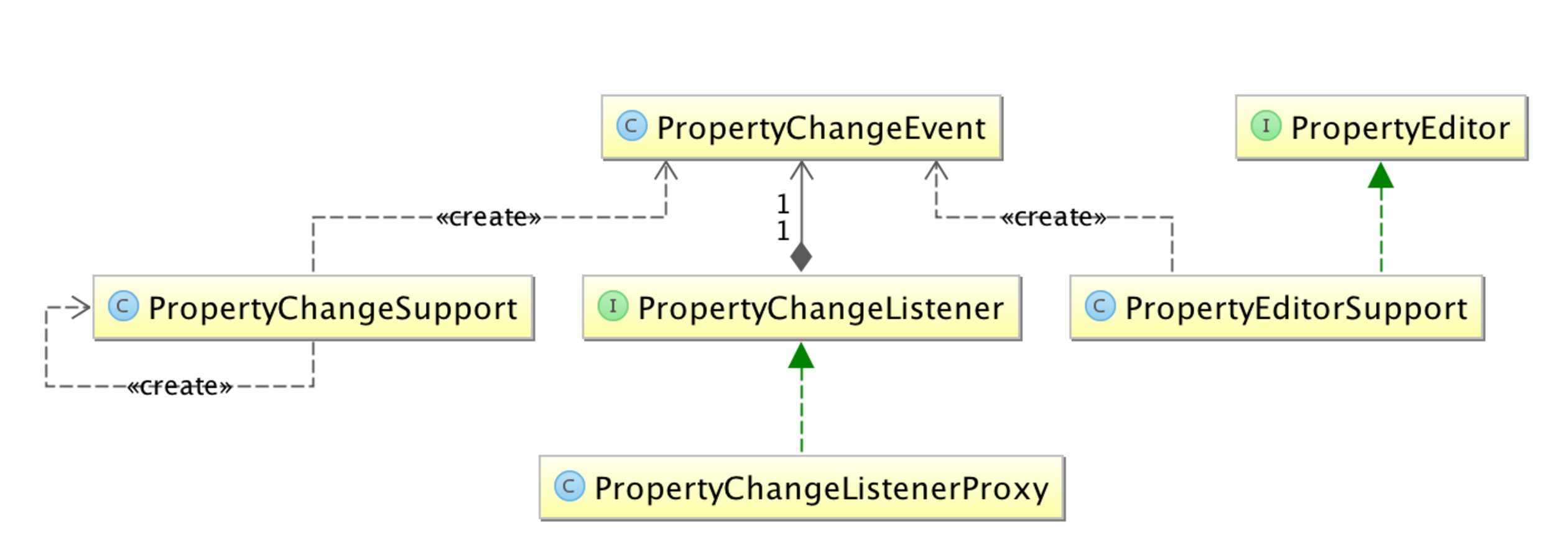
JavaBean规范提供了JavaBean的PropertyEditorSupportPropertyChangeSupport支持。PropertyEditorSupportPropertyChangeSupport就是被观察者,而PropertyChangeListener就是 观察者。

Alt text

具体实现自行研究,实例如下

1
2
3
4
5
6
7
8
9
10
11
12
13
14
15
16
17
18
19
20
21
22
23
24
25
26
27
28
29
30
31
import java.beans.PropertyChangeListener;
import java.beans.PropertyChangeSupport;
public class OrderBean {
PropertyChangeSupport listeners = new PropertyChangeSupport(this);
public OrderBean() {
this.orderStatus =OrderStatus.create;
}
private OrderStatus orderStatus;
public OrderStatus getOrderStatus() {
return orderStatus;
}
public void setOrderStatus(OrderStatus orderStatus) {
OrderStatus oldValue = this.orderStatus;
this.orderStatus = orderStatus;
//发布监听事件
firePropertyChange("orderEvent", oldValue, orderStatus);
}
public void addPropertyChangeListener(PropertyChangeListener listener) {
listeners.addPropertyChangeListener(listener);
}
public void removePropertyChangeListener(PropertyChangeListener listener){
listeners.addPropertyChangeListener(listener);
}
/**
* 触发属性改变的事件
*/
protected void firePropertyChange(String prop, Object oldValue, Object newValue) {
listeners.firePropertyChange(prop, oldValue, newValue);
}
}

1
2
3
4
5
6
7
8
9
10
11
12
public class MainTest {
public static void main(String[] args) {
OrderBean beans = new OrderBean();
beans.addPropertyChangeListener(new PropertyChangeListener(){
public void propertyChange(PropertyChangeEvent evt) {
System.out.println("oldValue: "+evt.getOldValue());
System.out.println("newValue: "+evt.getNewValue());
System.out.println("propertyName: "+evt.getPropertyName());
}});
beans.setOrderStatus(OrderStatus.pay_result_success);
}
}

Spring 事件驱动模型

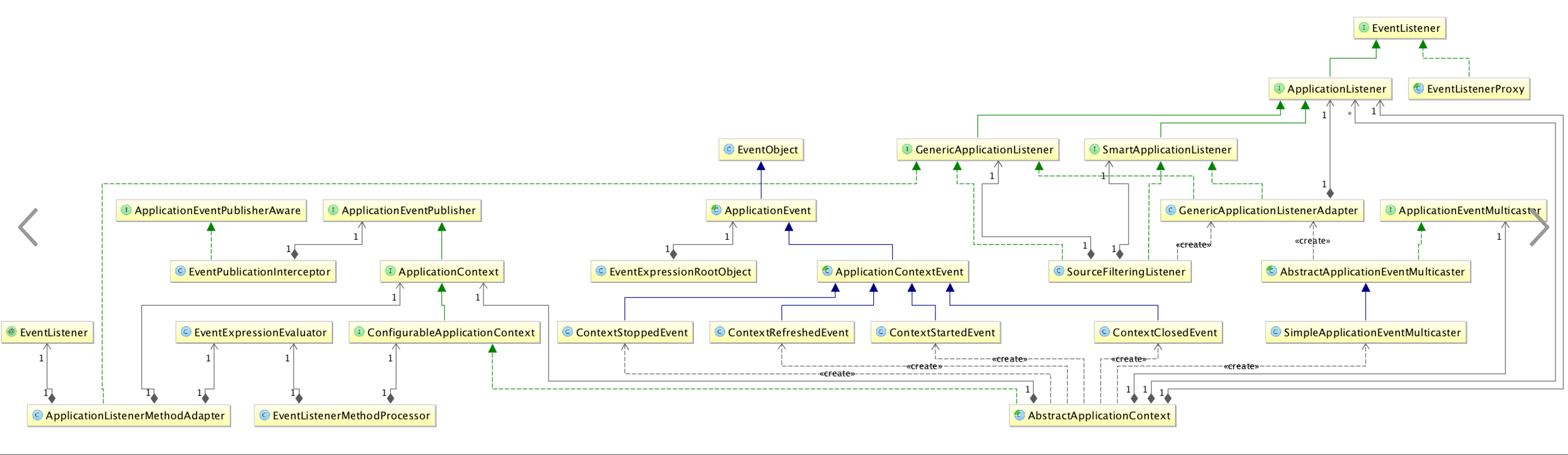
  1. 首先来看一下Spring的事件驱动模型图
    Alt text

事件ApplicationEvent

继承自JDKEventObjectJDK要求所有事件将继承它,并通过source得到事件源,比如我们的AWT事件体系也是继承自它;


系统默认提供了如下ApplicationEvent事件实现:
只有一个ApplicationContextEvent,表示ApplicationContext容器事件,且其又有如下实现:

  • ContextStartedEventApplicationContext 启动后触发的事件
  • ContextStoppedEventApplicationContext停止后触发的事件
  • ContextRefreshedEventApplicationContext初始化或刷新完成后触发的事件;(容器初始化完成后调用)
  • ContextClosedEventApplicationContext关闭后触发的事件;(如web容器关闭时自动会触发 spring 容器的关闭,如果是普通java应用,需要调用 ctx.registerShutdownHook(); 注册虚拟机关闭时的钩子才行 )
  • org.springframework.context.support.AbstractApplicationContext抽象类实现了LifeCyclestartstop回调并发布ContextStartedEventContextStoppedEvent事件;但是无任何实现调用它,所以目前无任何作用。

事件发布者:ApplicationEventPublisherApplicationEventMulticaster

系统默认提供了如下实现

  • ApplicationContext接口继承了ApplicationEventPublisher,并在AbstractApplicationContext实现了具体代码,实际执行是委托给ApplicationEventMulticaster(可以认为是多播)。
  • 我们常用的ApplicationContext都继承自AbstractApplicationContext,如ClassPathXmlApplicationContextXmlWebApplicationContext等。所以自动拥有这个功能。
  • 所以我们发送事件只需要通过ApplicationContext.publishEvent即可,没必要再创建自己的实现了。除非有必要。

事件监听者 : ApplicationListener

  • 其继承自JDKEventListener,JDK要求所有监听器将继承它,比如我们的AWT事件体系也是继承自它;
  • ApplicationListener接口:
    1
    2
    3
    4
    5
    6
    7
    8
    9
    10
    11
    12
    13
    14
    15
    package org.springframework.context;
    import java.util.EventListener;
    /**
    * @author Rod Johnson
    * @author Juergen Hoeller
    * @param <E> the specific ApplicationEvent subclass to listen to
    * @see org.springframework.context.event.ApplicationEventMulticaster
    */
    public interface ApplicationListener<E extends ApplicationEvent> extends EventListener {
    /**
    * Handle an application event.
    * @param event the event to respond to
    */
    void onApplicationEvent(E event);
    }
可以看到其 只提供了 onApplicationEvent 方法,我们需要在该方法实现内部判断事件类型来处理,也没有提供按顺序触发监听器的语义,所以Spring提供了另一个接口,SmartApplicationListener:

该接口可方便实现去判断支持的事件类型、目标类型,及执行顺序。

1
2
3
4
5
6
7
8
9
10
11
12
13
14
15
16
17
18
19
20
21
22
package org.springframework.context.event;
import org.springframework.context.ApplicationEvent;
import org.springframework.context.ApplicationListener;
import org.springframework.core.Ordered;
/**
* @author Juergen Hoeller
* @since 3.0
*/
public interface SmartApplicationListener extends ApplicationListener<ApplicationEvent>, Ordered {
/**
* Determine whether this listener actually supports the given event type.
* 事件类型判断
*/
boolean supportsEventType(Class<? extends ApplicationEvent> eventType);
/**
* Determine whether this listener actually supports the given source type.
* 事件源判断
*/
boolean supportsSourceType(Class<?> sourceType);
}

#六、Spring事件驱动模型实现原理
以下分析基于spring-4.2.5...

1
2
3
4
5
6
7
8
/** Helper class used in event publishing */
private ApplicationEventMulticaster applicationEventMulticaster;
/** Statically specified listeners */
private final Set<ApplicationListener<?>> applicationListeners = new LinkedHashSet<ApplicationListener<?>>();
/** ApplicationEvents published early */
private Set<ApplicationEvent> earlyApplicationEvents;

refresh()方法体内部 重点关注以下方法的调用:

  • prepareRefresh() 初始化 earlyApplicationEvents,其保存较早的ApplicationEvent 事件,一旦广播组件可用,这些事件就会通过广播组件 触发监听器执行 onApplicationEvent() 方法。
    *initApplicationEventMulticaster() 初始化事件广播组件。
  • registerListeners() 添加 实现了 ApplicationListener 的事件监听器,以及发布早期的 ApplicationEvent。

    1
    2
    3
    4
    5
    6
    7
    8
    9
    10
    11
    12
    13
    14
    15
    16
    17
    18
    19
    20
    21
    22
    23
    24
    25
    26
    27
    28
    29
    30
    31
    32
    33
    34
    35
    36
    37
    38
    39
    40
    41
    42
    43
    44
    45
    46
    47
    48
    49
    50
    51
    52
    53
    54
    55
    56
    57
    58
    59
    60
    61
    62
    63
    64
    65
    @Override
    public void refresh() throws BeansException, IllegalStateException {
    synchronized (this.startupShutdownMonitor) {
    // Prepare this context for refreshing.
    prepareRefresh();
    // Tell the subclass to refresh the internal bean factory.
    ConfigurableListableBeanFactory beanFactory = obtainFreshBeanFactory();
    // Prepare the bean factory for use in this context.
    prepareBeanFactory(beanFactory);
    try {
    // Allows post-processing of the bean factory in context subclasses.
    postProcessBeanFactory(beanFactory);
    // Invoke factory processors registered as beans in the context.
    invokeBeanFactoryPostProcessors(beanFactory);
    // Register bean processors that intercept bean creation.
    registerBeanPostProcessors(beanFactory);
    // Initialize message source for this context.
    initMessageSource();
    // Initialize event multicaster for this context.
    // 初始化上下文的事件多播组件,ApplicationEvent 触发时由multicaster通知给ApplicationListener
    initApplicationEventMulticaster();
    // Initialize other special beans in specific context subclasses.
    onRefresh();
    // Check for listener beans and register them.
    // 注册事件监听器,事件监听Bean统一注册到multicaster里头,ApplicationEvent事件触发后会由multicaster广播
    registerListeners();
    // Instantiate all remaining (non-lazy-init) singletons.
    finishBeanFactoryInitialization(beanFactory);
    // Last step: publish corresponding event.
    finishRefresh();
    }
    catch (BeansException ex) {
    if (logger.isWarnEnabled()) {
    logger.warn("Exception encountered during context initialization - " +
    "cancelling refresh attempt: " + ex);
    }
    // Destroy already created singletons to avoid dangling resources.
    destroyBeans();
    // Reset 'active' flag.
    cancelRefresh(ex);
    // Propagate exception to caller.
    throw ex;
    }
    finally {
    // Reset common introspection caches in Spring's core, since we
    // might not ever need metadata for singleton beans anymore...
    resetCommonCaches();
    }
    }
    }
  • 在调用 publishEvent()方法时,如果 onApplicationEvent 为空,就会立即触发通知,否则 会将 事件 添加到 earlyApplicationEvents 中。

1
2
3
4
5
6
7
8
9
10
11
12
13
14
15
16
17
18
19
20
21
22
23
24
25
26
27
28
29
30
31
32
protected void publishEvent(Object event, ResolvableType eventType) {
Assert.notNull(event, "Event must not be null");
if(this.logger.isTraceEnabled()) {
this.logger.trace("Publishing event in " + this.getDisplayName() + ": " + event);
}
Object applicationEvent;
if(event instanceof ApplicationEvent) {
applicationEvent = (ApplicationEvent)event;
} else {
applicationEvent = new PayloadApplicationEvent(this, event);
if(eventType == null) {
eventType = ResolvableType.forClassWithGenerics(PayloadApplicationEvent.class, new Class[]{event.getClass()});
}
}
// 如果 可能立即 调用 multicastEvent() 广播通知响应 事件监听器。
/*Multicast right now if possible - or lazily once the multicaster is initialized*/
if(this.earlyApplicationEvents != null) {
this.earlyApplicationEvents.add(applicationEvent);
} else {
/**/
this.getApplicationEventMulticaster().multicastEvent((ApplicationEvent)applicationEvent, eventType);
}
if(this.parent != null) {
if(this.parent instanceof AbstractApplicationContext) {
((AbstractApplicationContext)this.parent).publishEvent(event, eventType);
} else {
this.parent.publishEvent(event);
}
}
}

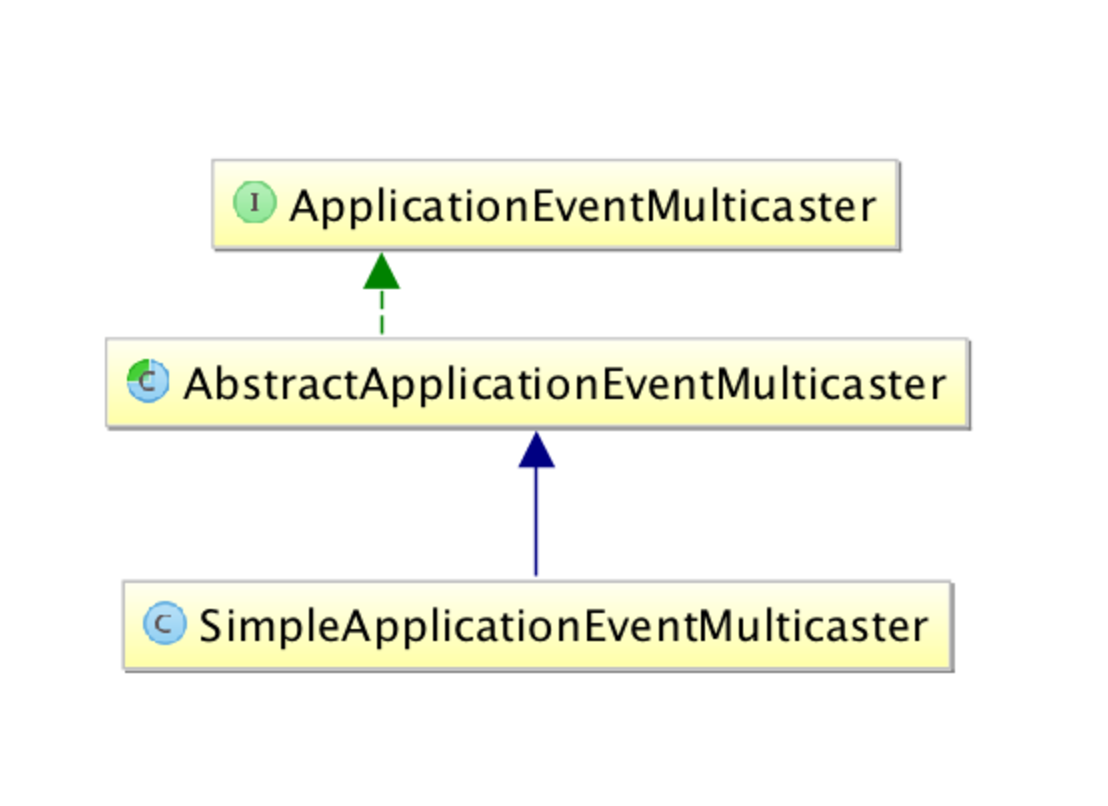
事件广播器类图如下:
Alt text

ApplicationEventMulticaster 类定义了 事件广播接口。
AbstractApplicationEventMulticaster 抽象类 实现了事件监听器的注册。

1
2
3
4
5
6
7
8
9
10
11
12
13
14
15
16
17
18
19
20
21
22
23
24
25
26
27
28
29
30
31
32
33
34
35
36
37
38
39
40
41
42
43
44
45
46
47
48
49
50
51
52
53
54
55
56
57
58
59
60
61
62
63
64
65
66
67
68
69
70
71
72
73
74
75
76
77
78
79
80
81
82
83
84
/*
* Copyright 2002-2015 the original author or authors.
*
* Licensed under the Apache License, Version 2.0 (the "License");
* you may not use this file except in compliance with the License.
* You may obtain a copy of the License at
*
* http://www.apache.org/licenses/LICENSE-2.0
*
* Unless required by applicable law or agreed to in writing, software
* distributed under the License is distributed on an "AS IS" BASIS,
* WITHOUT WARRANTIES OR CONDITIONS OF ANY KIND, either express or implied.
* See the License for the specific language governing permissions and
* limitations under the License.
*/
package org.springframework.context.event;
import org.springframework.context.ApplicationEvent;
import org.springframework.context.ApplicationListener;
import org.springframework.core.ResolvableType;
/**
* Interface to be implemented by objects that can manage a number of
* {@link ApplicationListener} objects, and publish events to them.
*
* <p>An {@link org.springframework.context.ApplicationEventPublisher}, typically
* a Spring {@link org.springframework.context.ApplicationContext}, can use an
* ApplicationEventMulticaster as a delegate for actually publishing events.
*
* @author Rod Johnson
* @author Juergen Hoeller
* @author Stephane Nicoll
*/
public interface ApplicationEventMulticaster {
/**
* Add a listener to be notified of all events.
* @param listener the listener to add
*/
void addApplicationListener(ApplicationListener<?> listener);
/**
* Add a listener bean to be notified of all events.
* @param listenerBeanName the name of the listener bean to add
*/
void addApplicationListenerBean(String listenerBeanName);
/**
* Remove a listener from the notification list.
* @param listener the listener to remove
*/
void removeApplicationListener(ApplicationListener<?> listener);
/**
* Remove a listener bean from the notification list.
* @param listenerBeanName the name of the listener bean to add
*/
void removeApplicationListenerBean(String listenerBeanName);
/**
* Remove all listeners registered with this multicaster.
* <p>After a remove call, the multicaster will perform no action
* on event notification until new listeners are being registered.
*/
void removeAllListeners();
/**
* Multicast the given application event to appropriate listeners.
* <p>Consider using {@link #multicastEvent(ApplicationEvent, ResolvableType)}
* if possible as it provides a better support for generics-based events.
* @param event the event to multicast
*/
void multicastEvent(ApplicationEvent event);
/**
* Multicast the given application event to appropriate listeners.
* <p>If the {@code eventType} is {@code null}, a default type is built
* based on the {@code event} instance.
* @param event the event to multicast
* @param eventType the type of event (can be null)
*/
void multicastEvent(ApplicationEvent event, ResolvableType eventType);
}

SimpleApplicationEventMulticaster在 AbstractApplicationEventMulticaster 的基础上实现了时间通知。 multicastEvent()方法会循环 所有的事件监听器,然后 通过 invokeListener() 方法 完成所有事件的广播通知并执行相应事件监听器的onApplicationEvent()方法。

1
2
3
4
5
6
7
8
9
10
11
12
13
14
15
16
17
18
19
20
21
22
23
24
25
26
27
28
29
30
31
32
@Override
public void multicastEvent(final ApplicationEvent event, ResolvableType eventType) {
ResolvableType type = (eventType != null ? eventType : resolveDefaultEventType(event));
for (final ApplicationListener<?> listener : getApplicationListeners(event, type)) {
Executor executor = getTaskExecutor();
if (executor != null) {
executor.execute(new Runnable() {
@Override
public void run() {
invokeListener(listener, event);
}
});
}
else {
invokeListener(listener, event);
}
}
}
protected void invokeListener(ApplicationListener listener, ApplicationEvent event) {
ErrorHandler errorHandler = getErrorHandler();
if (errorHandler != null) {
try {
listener.onApplicationEvent(event);
}
catch (Throwable err) {
errorHandler.handleError(err);
}
}
else {
listener.onApplicationEvent(event);
}
}


#七、Spring事件驱动模型实例的实现
以上述一中的示例进行实现如下:

  1. 定义实体类User

    1
    2
    3
    4
    5
    6
    7
    8
    9
    10
    11
    12
    13
    14
    15
    16
    17
    18
    19
    20
    21
    22
    package com.event.register;
    import java.io.Serializable;
    public class User implements Serializable {
    private String username;
    private String password;
    public User(final String username, final String password) {
    this.username = username;
    this.password = password;
    }
    public String getUsername() {
    return username;
    }
    public void setUsername(final String username) {
    this.username = username;
    }
    public String getPassword() {
    return password;
    }
    public void setPassword(final String password) {
    this.password = password;
    }
    }
  2. 定义注册事件 RegisterEvent

    1
    2
    3
    4
    5
    6
    7
    package com.event.register;
    import org.springframework.context.ApplicationEvent;
    public class RegisterEvent extends ApplicationEvent {
    public RegisterEvent(User user) {
    super(user);
    }
    }
  3. 对注册事件实现监听

    1
    2
    3
    4
    5
    6
    7
    8
    9
    10
    11
    12
    13
    14
    15
    16
    17
    18
    19
    20
    package com.event.register;
    import org.springframework.context.ApplicationEvent;
    import org.springframework.context.event.SmartApplicationListener;
    import org.springframework.stereotype.Component;
    @Component
    public class SmsNoticeRegisterListener implements SmartApplicationListener {
    public boolean supportsEventType(Class<? extends ApplicationEvent> event) {
    return event == RegisterEvent.class;
    }
    public boolean supportsSourceType(Class<?> aClass) {
    return aClass == User.class;
    }
    public void onApplicationEvent(ApplicationEvent applicationEvent) {
    System.out.println("注册成功,发送短信通知用户 : " + ((User)applicationEvent.getSource()).getUsername());
    }
    public int getOrder() {
    return 1;
    }
    }
1
2
3
4
5
6
7
8
9
10
11
package com.event.register;
import org.springframework.context.ApplicationListener;
import org.springframework.scheduling.annotation.Async;
import org.springframework.stereotype.Component;
@Component
public class EmailRegisterListener implements ApplicationListener<RegisterEvent> {
@Async
public void onApplicationEvent(final RegisterEvent event) {
System.out.println("注册成功,发送确认邮件给:" + ((User)event.getSource()).getUsername());
}
}
  1. 发布注册事件
    1
    2
    3
    4
    5
    6
    7
    8
    9
    10
    11
    12
    13
    14
    15
    16
    17
    18
    19
    20
    21
    22
    23
    24
    25
    26
    27
    28
    29
    30
    31
    32
    33
    package com.event.register;
    import org.springframework.beans.factory.annotation.Autowired;
    import org.springframework.context.ApplicationContext;
    import org.springframework.stereotype.Service;
    @Service
    public class RegisterService {
    @Autowired
    private ApplicationContext applicationContext;
    public void register(String username, String password) {
    System.out.println(username + "注册成功!");
    publishRegisterEvent(new User(username, password));
    }
    private void publishRegisterEvent(User user) {
    applicationContext.publishEvent(new RegisterEvent(user));
    }
    }
    ```
    ```java
    <?xml version="1.0" encoding="UTF-8"?>
    <beans xmlns="http://www.springframework.org/schema/beans"
    xmlns:xsi="http://www.w3.org/2001/XMLSchema-instance"
    xmlns:context="http://www.springframework.org/schema/context"
    xmlns:aop="http://www.springframework.org/schema/aop"
    xmlns:task="http://www.springframework.org/schema/task"
    xsi:schemaLocation="http://www.springframework.org/schema/beans http://www.springframework.org/schema/beans/spring-beans.xsd
    http://www.springframework.org/schema/aop http://www.springframework.org/schema/aop/spring-aop.xsd
    http://www.springframework.org/schema/task http://www.springframework.org/schema/task/spring-task.xsd
    http://www.springframework.org/schema/context http://www.springframework.org/schema/context/spring-context.xsd
    " default-lazy-init="true">
    <context:component-scan base-package="com.event"/>
    <!-- 开启@AspectJ AOP代理 -->
    <aop:aspectj-autoproxy proxy-target-class="true"/>
    </beans>
1
2
3
4
5
6
7
8
9
10
11
12
13
14
15
16
17
18
19
20
21
package com.event.register;
import org.junit.Test;
import org.junit.runner.RunWith;
import org.springframework.beans.factory.annotation.Autowired;
import org.springframework.test.context.ContextConfiguration;
import org.springframework.test.context.junit4.SpringJUnit4ClassRunner;
@RunWith(SpringJUnit4ClassRunner.class)
@ContextConfiguration(locations={"classpath:spring-config-register.xml"})
public class RegisterServiceIT {
@Autowired
private RegisterService registerService;
@Test
public void testRegister() {
registerService.register("xxx", "password123");
try {
Thread.sleep(Integer.MAX_VALUE);
} catch (InterruptedException e) {
e.printStackTrace();
}
}
}